HDR10+ Dolby Vision - In games
When you turn on HDR10+, the only thing that actually happens is this: the TV tells the game its peak brightness, and the game auto-fills that value for you. That's it. It's an automatic setup step, nothing more.
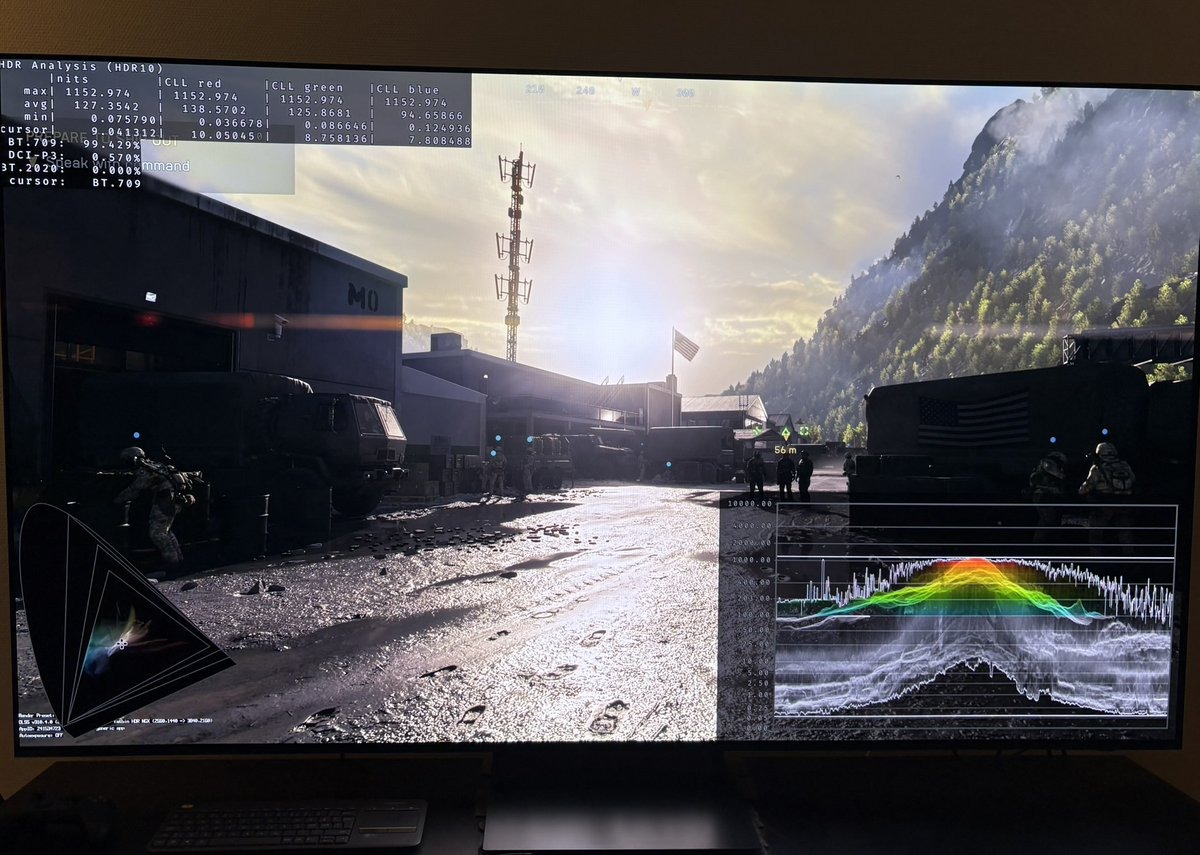
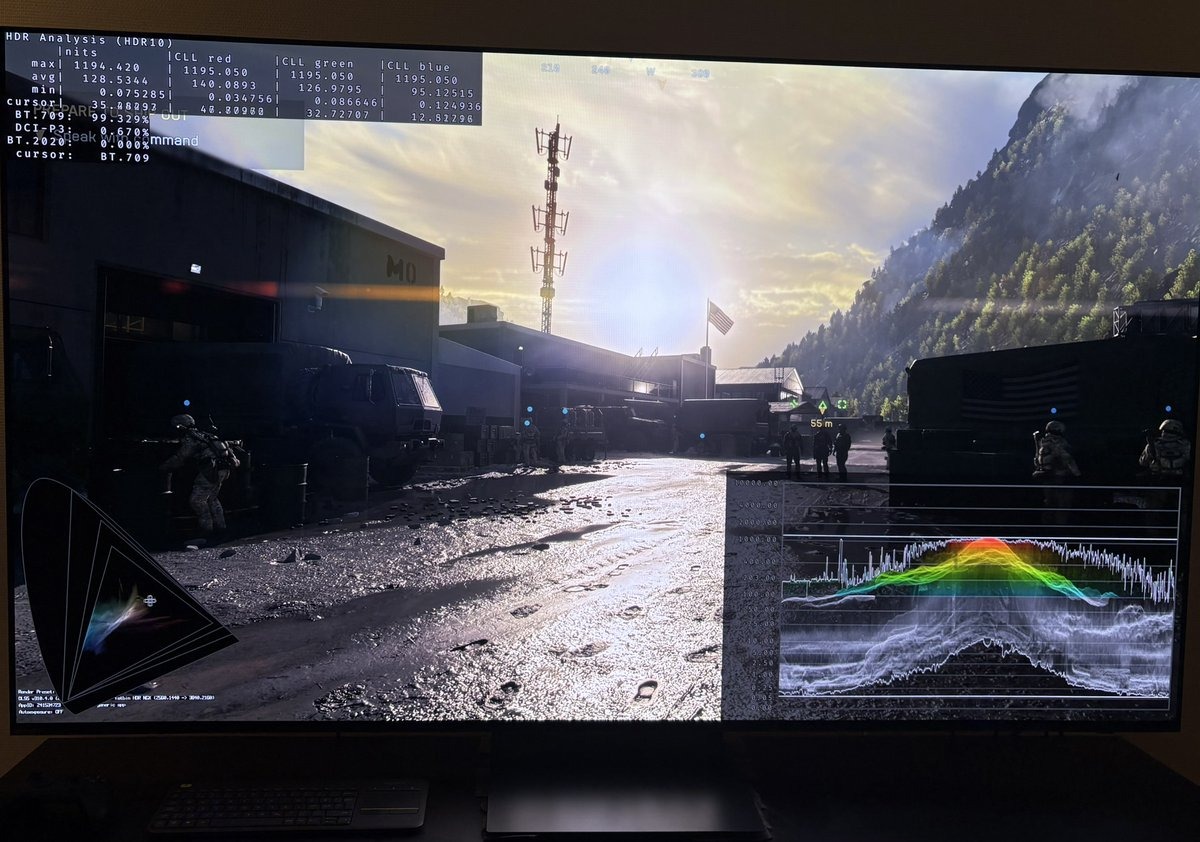
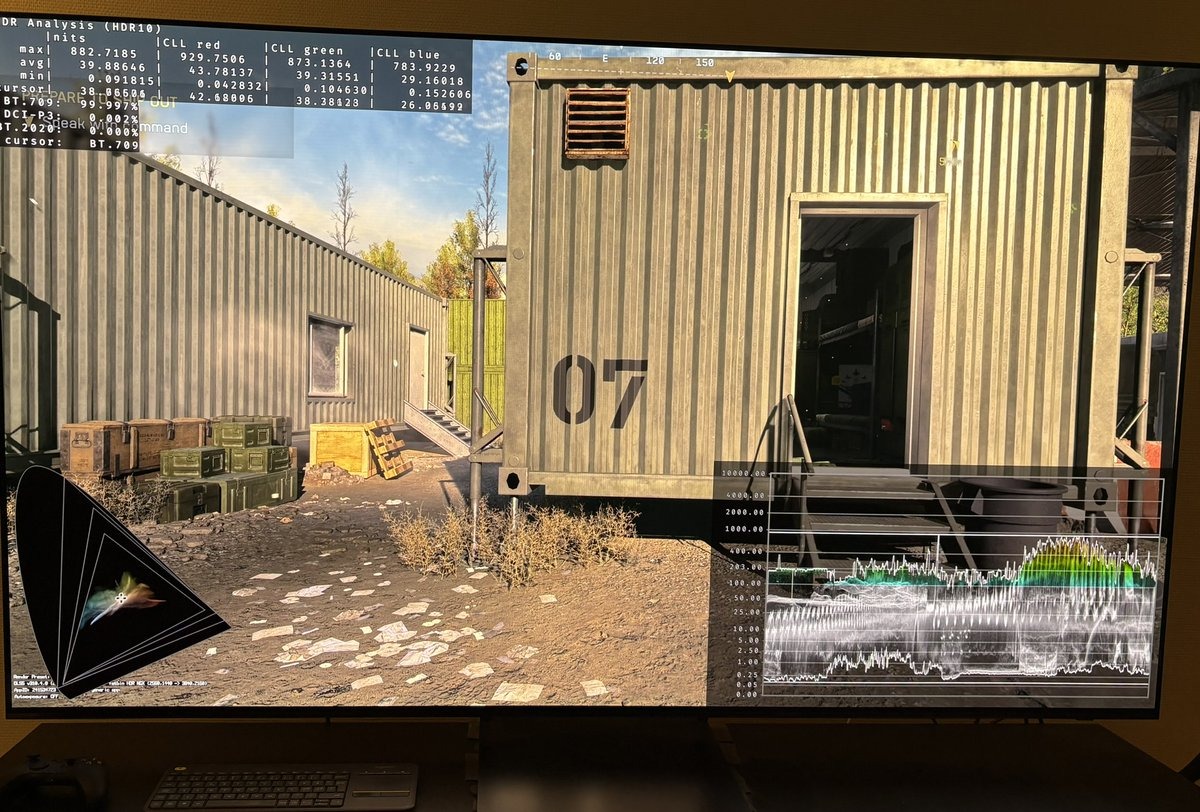
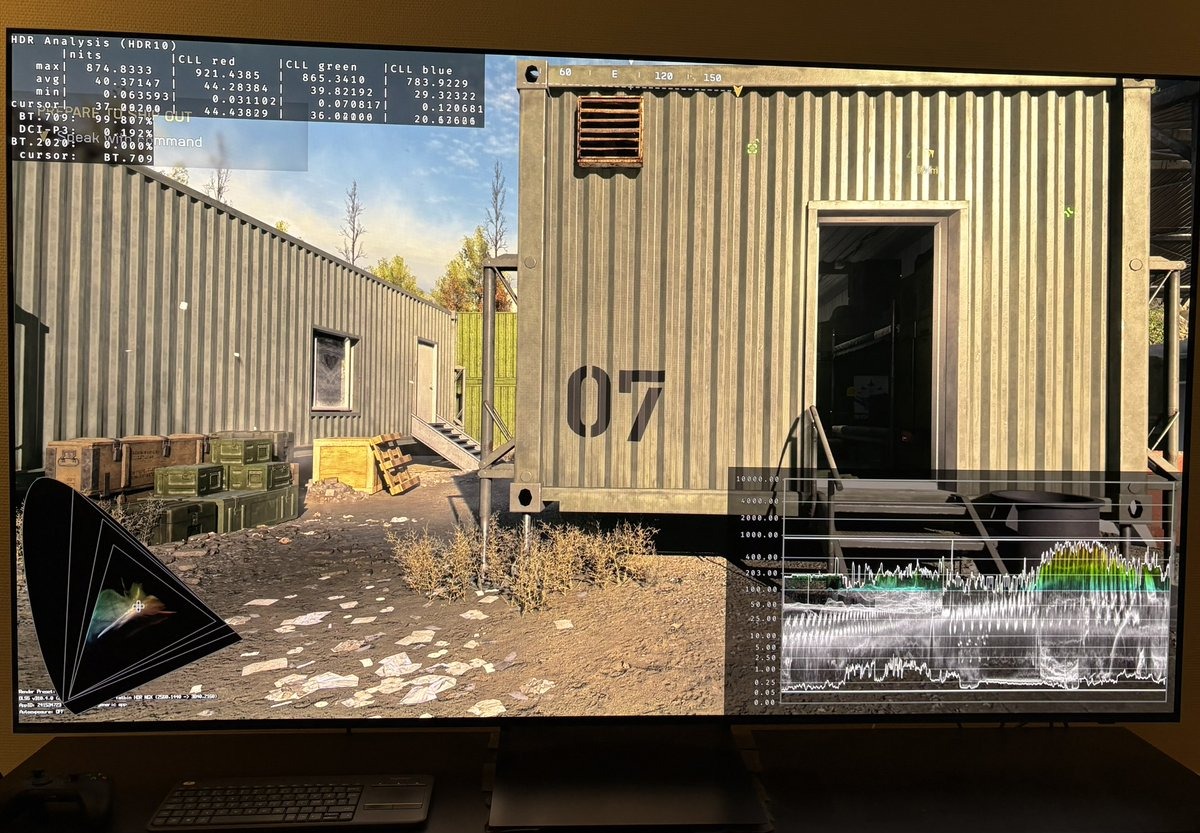
I tested this on Red Dead Redemption 2 and Battlefield 6 using HDR waveform analysis (Lillium's HDR analysis Tool).
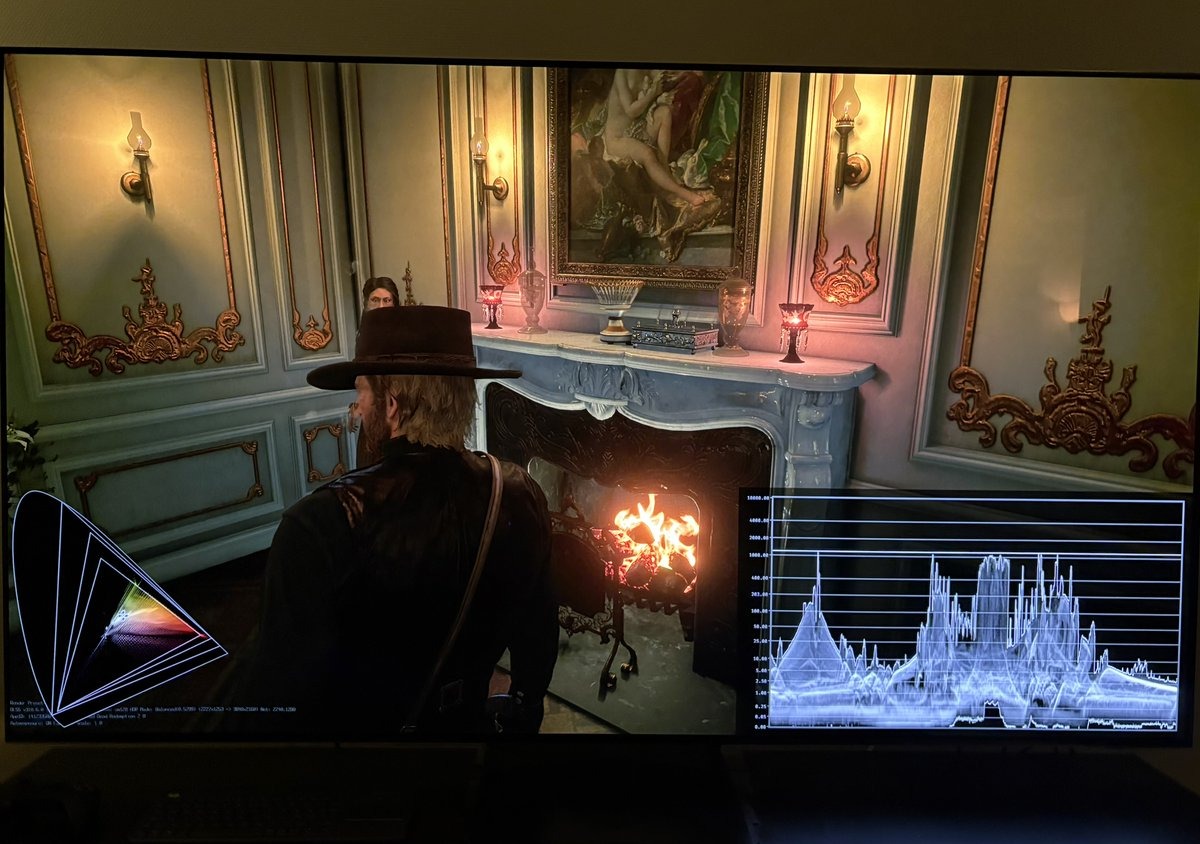
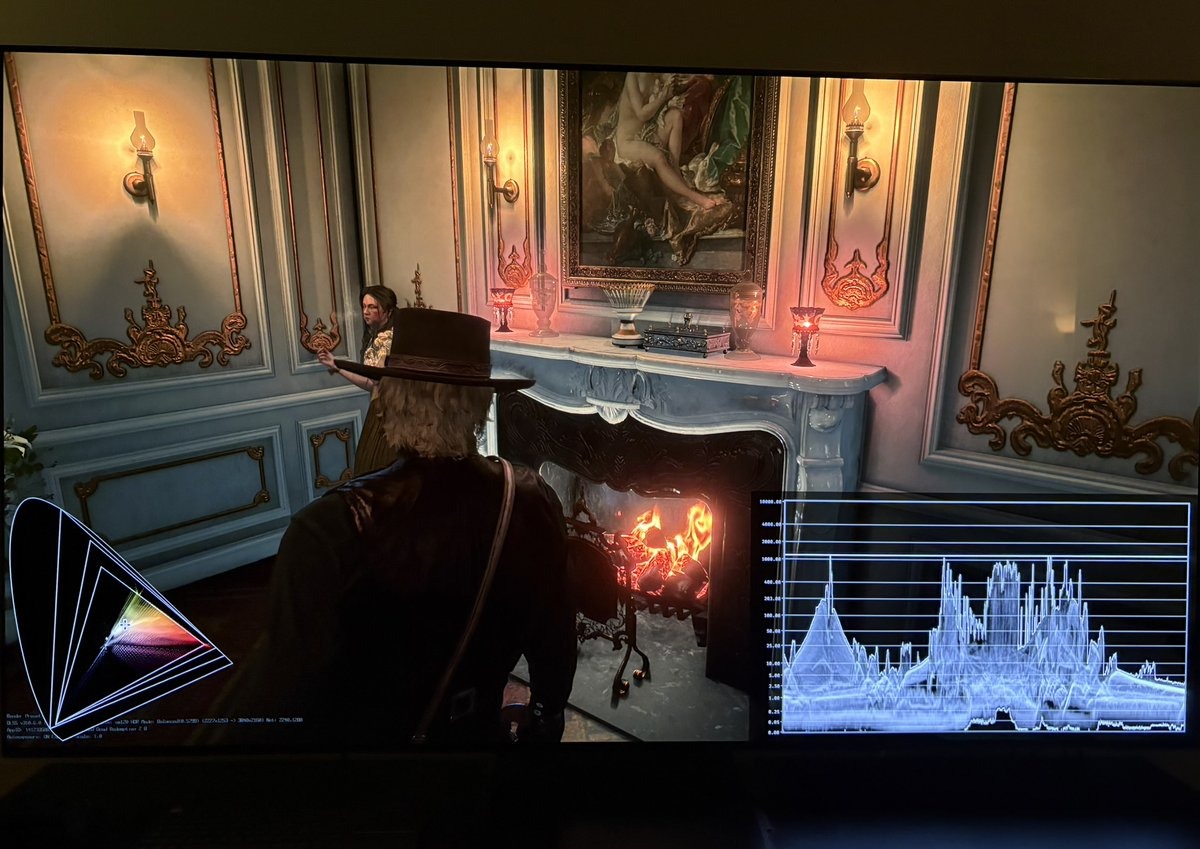
HDR10+ didn't change the game's tone mapping at all. The only thing it did was set the in-game peak brightness slider automatically — on my Samsung s90c QD-OLED TV it filled in 1200 nits, the panel's factory figure — and it left paper white in RDR2 and brightness in BF6 untouched. In RDR2 that means it kept the game's much too low default paper white of 100 (see my HDR analysis of RDR2).
Below are the waveforms from RDR2 and Battlefield 6 — HDR10 vs HDR10+. See for yourself: no difference.
If you already know your TV's peak brightness and set it yourself, HDR10+ does nothing for you. The only people it helps are those who don't know their peak and never set it manually — and even then they still have to adjust other relevant HDR settings like paper white, game brightness, shadows / black levels etc. Maybe some games also do that for you in HDR10+. But not in RDR2 and Battlefield I tested.
I see no reason to use HDR10+, when you must check if the other HDR settings are setup correctly anyway - including setting up paper white (game brightness), if a game has such a setting.
What HDR10+ Gaming is NOT
I think gamers are expecting HDR10+ to do much more than this. I did myself before doing this research and testing.
HDR10+ Gaming is not the same as HDR10+ for movies, and it's not Dolby Vision for gaming.
Those formats do something real: frame-by-frame or scene-by-scene tone mapping. The idea is that instead of one tone mapping curve for the whole game, each scene gets its own — a dark scene and a bright scene are handled differently, so the display's range is spent where each scene actually needs it. More detail in the shadows in dark scenes, more detail in the highlights in bright ones. That genuinely can benefit gamers.
HDR10+ Gaming does none of that. No scene-by-scene work is required for a game to carry the HDR10+ label. And because it's source-based — the game engine does the tone mapping, not the TV — even if a developer did build scene-by-scene tone mapping, it would be part of the engine and would apply to the game's normal HDR10 output too. I have measured HDR10 across 65 games. None of them do it.
What Dolby Vision does — and the three ways games use it
Note: I can't test Dolby Vision myself — my Samsung TV doesn't support it — so this section is how it works, not something I've measured, unlike the HDR10+ results above.
Dolby Vision works the opposite way to HDR10+ Gaming. Here the TV does do the work: the game hands the TV extra information about each scene, and the TV does the final tone mapping using detailed knowledge of that exact TV model. This is real scene-by-scene tone mapping — a dark scene and a bright scene are treated differently, instead of one fixed setting for the whole game. That's the thing gamers actually imagine they're getting from HDR10+, and it's the thing HDR10+ Gaming doesn't do.
But "supports Dolby Vision" can mean three very different things, and only two of them involve real work:
1. Container. The console wraps an ordinary HDR10 signal in a Dolby Vision container and lets the TV do the tone mapping. The developer hasn't authored any scene-by-scene data — the game's HDR10 image is simply carried through the Dolby Vision path and processed by the TV.
2. Dolby's toolkit (SIDK integration, or the Unreal plugin). The developer uses Dolby's software, which automatically analyses each scene and creates the scene-by-scene information for them. This is real per-scene tone mapping, and the developer doesn't have to do much by hand — the tool does it. Most games with genuine Dolby Vision use this route.
3. Custom-engine integration. The developer builds Dolby Vision directly into their own game engine and tunes it themselves. Very few games do this — it's the most effort for the smallest extra gain.
The limitations
Even when it's working as intended, Dolby Vision for games has real downsides — and the first ones matter most to anyone who cares about picture accuracy or responsiveness:
- Worse accuracy, often. A TV's Dolby Vision game mode frequently tracks the EOTF (the brightness/gamma curve) less accurately than the same TV's HDR10 game mode. Reviewers like HDTVTest measure this repeatedly — DV mode can look flashier while being less faithful to how the game should actually look. For accuracy, a well set-up HDR10 game mode regularly beats Dolby Vision.
- Implementation quality varies. Dolby Vision is only as good as the game's implementation. Some titles have shipped looking dimmer or flatter than their own HDR10 version — a badly done DV mode can actively look worse than plain HDR10. That's not a fault of the format itself, but it's common enough that "has Dolby Vision" is no guarantee of a better picture.
- It can add input lag, which matters in games.
- Mostly Xbox-only. Dolby Vision gaming is essentially an Xbox Series X/S feature. On PC it's barely there — games that list Dolby Vision usually just output HDR10 on Windows, and while Windows 11 has begun adding Dolby Vision support, it's immature and aimed mainly at video, not a real gaming path (as of mid-2026).
- You need a Dolby Vision TV. Samsung TVs don't support it at all — so for a lot of us it's not even an option.
- It costs the developer a licence fee. Dolby charges for it, which is a big reason so few games bother.
HDR10+ for movies - difference to Dolby Vision
Both do the same core job: dynamic, scene-by-scene metadata that tells the TV how to tone map each scene, instead of one fixed setting for the whole film (which is what plain HDR10 does). So at the concept level they're the same idea, competing formats.
The real differences:
Licence and cost. Dolby Vision is proprietary — Dolby charges manufacturers and studios a licence fee. HDR10+ is open and royalty-free (Samsung-led, created largely as a free alternative to avoid paying Dolby). This is the single biggest practical difference and it drives most of the others.
Colour depth. Dolby Vision's system allows up to 12-bit colour; HDR10+ is 10-bit. In practice almost no consumer TV is a true 12-bit panel, so this is more a spec-sheet difference than something you'd usually see — but it's the technical ceiling difference people cite.
Display calibration knowledge. Dolby Vision includes Dolby's characterisation of the specific TV — the TV is profiled to a Dolby reference, and the tone mapping uses that. HDR10+ relies on the TV's own reported capabilities rather than a Dolby-certified profile. DV's approach is more controlled; it's also part of why it's licensed and costs money.
Adoption. This is the everyday difference for a viewer. Dolby Vision is far more widely supported — most streaming services and 4K Blu-rays that carry dynamic HDR use Dolby Vision, and most premium TVs support it. HDR10+ has real but smaller backing: Samsung (who refuse to support Dolby Vision on their TVs), Amazon Prime Video, and some others. So which one reaches you depends heavily on your TV brand and what you're watching.
My personal take
HDR10+ Gaming is, in my measured testing, close to pointless — it auto-fills your peak brightness and that's basically it.
Dolby Vision frequently is no better than a well set-up HDR10 mode, sometimes worse, and mostly an Xbox-only feature.
For a gamer, I wouldn't rule out a good TV over missing Dolby Vision, and I see no reason to reach for HDR10+.
Set your HDR up properly in plain HDR10 and you're not missing anything.