RenoDX - UE - extended version - Installation and setup
Install it using my guide below or use RHI (RenoDX HDR Installer) in the link:
https://github.com/RankFTW/RHI/releases/tag/RHI-2.4.9
Create engine.ini file
(If it doesn't already exist next to the GameUserSettings.ini file)
- For Steam: Go to %localappdata%gameSavedConfigWindows
- For GamePass: Go to %localappdata%gameSavedConfigWinGDK
- Create a new text file, and name it Engine.ini
- Open the file, and paste the text below into it:
- Right click Engine.ini, click properties, check "Read-Only", and then "Apply"
Copy into engine.ini (step 4 above):
[SystemSettings]
r.AllowHDR=1
r.HDR.EnableHDROutput=1
r.HDR.Display.OutputDevice=3
r.HDR.Display.ColorGamut=2
r.HDR.UI.CompositeMode=1
[/Script/Engine.RendererSettings]
r.LUT.UpdateEveryFrame=1
Install Reshade
- Download and install Reshade with full add on support from here: https://reshade.me/
Install the RenoDX HDR mod extended version
- Download the file from here: https://t.co/EM7yX5MLSZ
- Put the file where the games .exe file is (the same place as you installed Reshade).
Setup RenoDX HDR mod extended version
- Open Reshade menu (press "Home") - The screen will most likely be black at startup the first time.
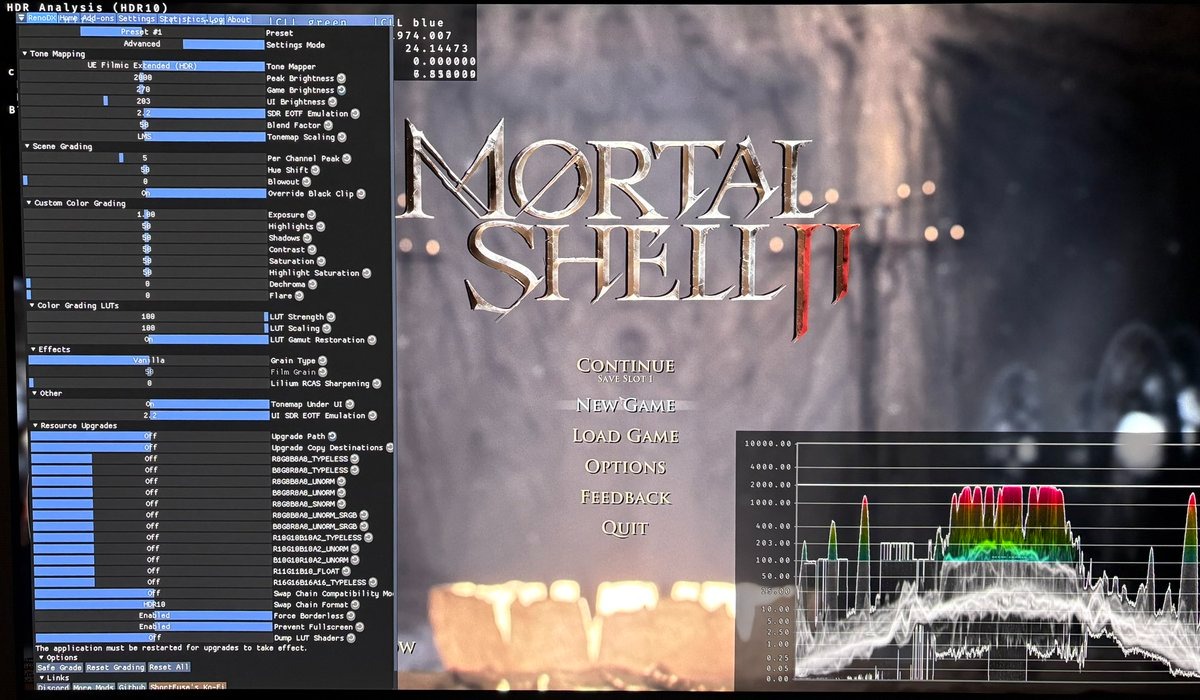
- In Settings Mode choose Advanced (will then look like in picture below)
- In Resource Upgrades, set Upgrade Path to "OFF". It's the default mode.
- In Resource Upgrades, set "Upgrade Copy Destinations", to "OFF"
- Restart game
- If it's still black screen then change format upgrades, such as R10G10B10A2_UNORM to Output Size under Resource Upgrades.
- Restart game
Disclaimer
I have no connection to the modding community around RenoDX and I'm not a specialist in RenoDX. I'm a gamer, just like you, who uses RenoDX. I don't know what all settings do in RenoDX or all issues in relation to installation of these mods. So keep that in mind.
I have a huge appreciation for what RenoDX and their modders/developers do for the PC gaming community. Thank you👍