RenoDX HDR mod - Installation and setup
In this article I will explain:
- What is RenoDX
- Where to get the mod
- How to set it up
I will use Resident Evil Requiem as an example and I will give recommendations for different display types (OLED, LCD/LED and monitors).
Disclaimer
I have no connection to the modding community around RenoDX and I'm not a specialist in RenoDX. I'm a gamer, just like you, who have used RenoDX a lot. I don't know what all settings do in RenoDX. So keep that in mind.
I have a huge appreciation for what RenoDX and their modders/developers do for the PC gaming community. Thank you👍
What is RenoDX
RenoDX is an amazing HDR mod we can use on PC. It basically fixes HDR in most of our games on PC (those that needs fixing), including getting us native HDR in SDR only games.
So if there is a RenoDX mod for a game, then the rule of thumb is to always install it. It means something needs to be fixed.
RenoDX fixes a lot of issues under the hood, so to speak. So just by installing it, a lot is already fixed, such as HDR tone mapping issues and black level floor raises for instance.
The sliders/settings in RenoDX is to be seen as something you need to use for tuning to the capabilities of your display and your personal preferences.
Where to get the mod
All supported games can be found here and it's explained how to install it:
https://github.com/clshortfuse/renodx/wiki/Mods
There is also an RenoDX Extended Version of the Unreal Engine multi-game mod. It isn't listed on the official GitHub page and is distributed mainly through the RenoDX Discord.
I recommend you use RHI (Reshade HDR Installer) to help install RenoDX mods and Reshade. It can be found here:
Link to RHI
I don't fully know the differences between the extended and non extended version, so I wont try to explain it. If you want to know more, ask on the RenoDX Discord.
I use the Extended version myself on most Unreal Engine games that do not have their own dedicated RenoDX mod. It is a bit more difficult to install than the standard mods.
Invite to the RenoDX Discord Server in this link:
https://discord.gg/renodx
How to set it up
I will cover the most important settings here. The settings I use in Resident Evil Requiem can be seen in the picture below.
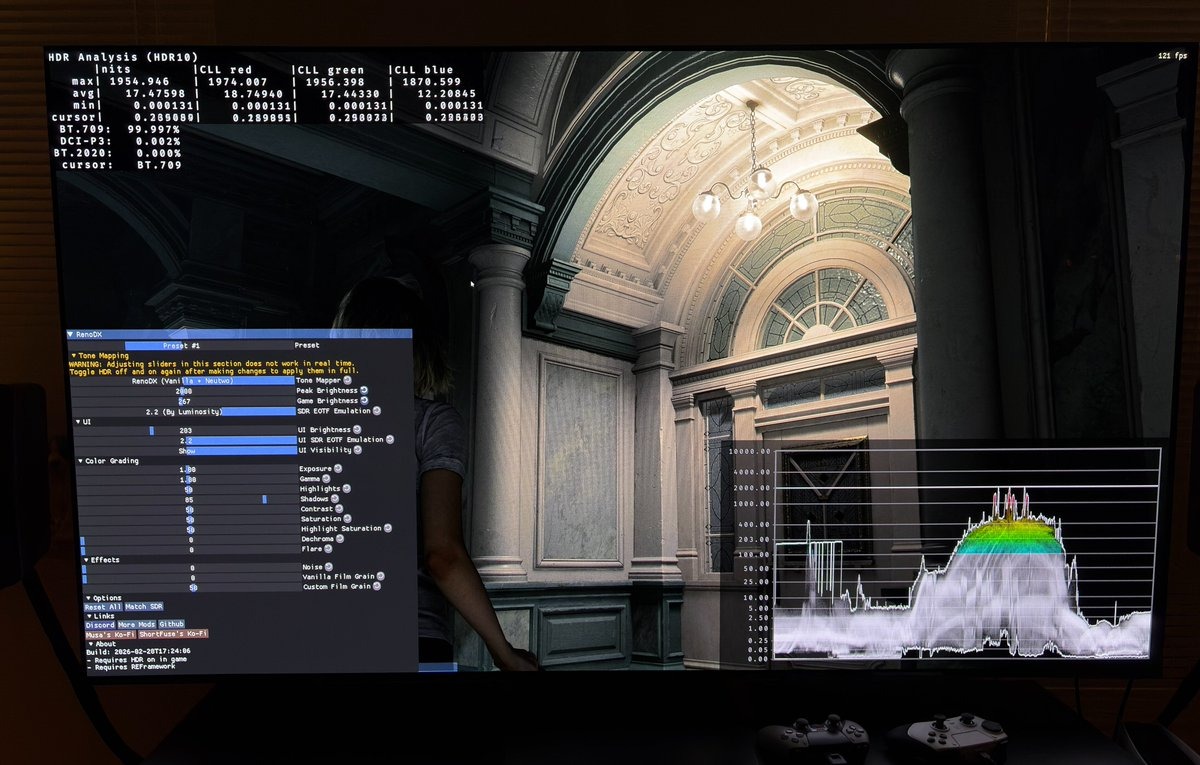
Let me start by saying that there is no right and wrong. You can adjust the settings as you like and do what you think looks best. Trust your eyes and use my recommendations as starting points or guidelines.
Not all sliders always work in real time. You have to go into the games menu and turn on and off HDR for changes to take effect.
HDR needs to be on in Requiem for the mod to work. In other games it can be the opposite, so always see the installation instructions on Nexus mods or the RenoDX discord server. Or simply try on and off.
1) Peak brightness
This value changes peak brightness, but also upper midtones.
Set it to the peak brightness your TV can do on a 2-3% window.
See my articles about how to setup HDR on OLED TVs and OLED gaming monitors.
You can look for the peak brightness number on different window sizes on rtings.com for your display. They test most displays (It unfortunately requires subscription, but why not pay for a month).
2) Game brightness
This is a games paper white or diffuse white. It adjusts the overall brightness on the screen by changing midtones, lower midtones and upper shadows.
In theory (following the HLG guidelines) it has to be set to;
- 180 nits for a 800 nits capable display
- 203 nits for 1000 nits.
- 267 nits for 1500 nits
- 343 nits for 2000 nits
You need to increase game brightness as you increase max luminance. The purpose is to have enough room for highlights to pop and still have an overall brightness that utilizes the capabilities of your display.
There are different thoughts about how to setup game brightness in games. I have written a separate article that reflects my view on it.
In requiem there is a lot of tiny fog all over the screen in most scenes. So in this game I prefer to use a bit lower game brightness value myself. So I recommend 203 nits for most displays and I use 267 nits myself for my 2000 nits display.
Don't get too fixated on setting up game brightness according to the HLG guidelines. Here I recommend you set it to what you think looks most natural to your eyes.
It can also depend a bit on how much brightness you have in your room. Increase it a bit if you are gaming in a very bright room.
3) Shadows
This setting adjusts the detail in the shadows. If there is still a black level raise then I usually use this setting to lower the shadows.
In requiem it's different. Just by installing the mod, the black level raise is fixed and the shadow area in general seems to be lowered a lot to me. The modder has already setup the shadow value to 85 from the standard 50. I agree with this value and use it myself.
If you think the shadows look too dark, then try and push the button in RenoDX "Match SDR". It shows what the shadows looks like in SDR. SDR actually have even darker shadows.
I prefer dark shadows in a horror game on an OLED. And we have a flashlight, so use it.
4) Noise / Film grain
The game uses film grain. I always turn that off. It's just noise to me. You can turn it off, or reduce it, by moving the slider all the way to the left, as I did. Do the same for the noise slider. I actually haven't tested what it does, but noise I don't want in my image.
I encourage you to test out what the different sliders changes and set it up for your TV and personal preference.